
Go to Windows platform Display platforms icon
Go to Windows platform Go to Mac platform Go to Android platform Go to iOS platform
EZ CD Audio Converter icon

EZ CD Audio Converter

13.2.0.1
5 2 reviews
12.8 k downloads
security security

Convert your music into any format

Advertisement
Remove ads and more with Turbo
Advertisement
Remove ads and more with Turbo
Andrés López icon
Reviewed by
Andrés López
Content Editor
Andrés López is part of Uptodown's in-house Editorial Team. Translated by Uptodown Localization Team

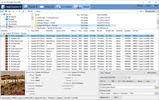
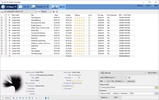
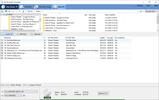
EZ CD Audio Converter is a software that lets you convert practically any audio file while maintaining the highest possible quality in the process. This program has a classic interface with a very simple style, so you can get the hang of it in a matter of seconds.

The list of formats you can convert from includes the following: AAC-LC, AAC, AC-3, AIFF, AU/SND, Apple Lossless, Atmos, CAF, CD-DA, DFF, DSD, DSF, DTS, DXD, FLAC, HE-AAC (v2), MP1, MP2, MP3, Monkey's Audio, Musepack, Opus, PCM, Real Audio, Shorten, Speex, SACD ISO, TAK, True Audio, TrueHD, Vorbis, WAV, WavPack, Wave64, Windows Media Audio, and xHE-AAC.

Advertisement
Remove ads and more with Turbo

On the other hand, the list of formats you can convert to, although slightly less extensive, includes: AAC-LC, AAC, ALAC, AC-3, AIFF, AU/SND, Apple Lossless, CD-DA, DFF, DSD , DSF, DXD, FLAC, HE-AAC (v2), MP3, Monkey's Audio, Musepack, Real Audio, RIFF, Vorbis, WAV, WavPack, Wave64, Windows Media Audio, and xHE-AAC. Likewise, when converting files, you can choose between the following sample rates: 8 kHz - 384 kHz, DSD64 (2.8224 MHz), DSD128 (5.6448 MHz), and DSD256 (11.2896 MHz).

One of the most important aspects of converting an audio file is protecting its metadata. So, of course, EZ CD Audio Converter keeps all the metadata for the songs you convert intact. To do so, the application borrows information from GD3, Gracenote, MusicBrainz, Discogs, Freedb, and Amazon.

EZ CD Audio Converter is an excellent audio conversion tool, thanks to which you can convert all the music you have stored locally to the format of your choice. Best of all, the metadata will be preserved, and the resulting file will have the highest possible sound quality.

Information about EZ CD Audio Converter 13.2.0.1

Basic information

Developer Poikosoft
Category Audio Converters
Rating All ages
Languages English

Distribution model

Pricing Free
License Proprietary
Copyright © 2026 Poikosoft
Why is this app published on Uptodown? (More information)

Security and privacy

Required permissions Not applicable
See security and antivirus report

Download info

Downloads 12,815
Date Sep 7, 2026
File type EXE
Size 36.13 MB
SHA256 48de16c8177e0d0785cc2f074c8008a27c500c5e8191c435a19de860d4c05ee2
Advertisement
Remove ads and more with Turbo

Older versions

See more
exe 13.1.0.1 Apr 23, 2026
exe 13.0.1.1 Mar 23, 2026
exe 12.4.0.1 Dec 9, 2025
exe 12.3.1.1 Nov 10, 2025
exe 12.1.0.7 Apr 21, 2025
exe 12.1.0.2 Mar 24, 2025

Rate this App

Review the app
EZ CD Audio Converter icon

Rating

5.0
5
4
3
2
1
2 reviews

Comments

dangerouswhiteapricot61088 icon
dangerouswhiteapricot61088
in 2024

excellent program

Like
Reply
Advertisement
Remove ads and more with Turbo
CDXtract icon
Manage samples and music libraries
Power MP3 WMA Converter icon
Convert files to WMA, MP3, and WAV formats
Any Audio Converter icon
Convert audio files to several different formats
Easy M4P Converter icon
Remove DRM from iTunes, Convert M4P to MP3.
Free MP4 to MP3 Converter icon
Convert various types of files to MP3 and WAV
Switch Audio File Converter icon
Transform any audio format into MP3
Free Audio Converter icon
Convert your audio files to MP3, WAV, WMA, OGG,...
FLAC To MP3 icon
FLAC To MP3
Spotify icon
Stream your favorite artists for free
iTunes icon
Apple's comprehensive multimedia player and online marketplace
Apple Devices icon
Manage and update your Apple devices
VirtualDJ icon
Create great DJ sets and stream them online
Voicemod - Live Voice Changer icon
Change your voice with this complete modulator
Dolby Access icon
Activate and configure Dolby Atmos on your Windows PC
Audacity icon
Record and edit all kinds of audio files
AIMP icon
Excellent choice for audio playback